

OkCupid Dating: Pricing, Features, and How to Use It Safely in 2026
OkCupid is different from apps like Tinder or Bumble. Instead of making you swipe based only on photos, the OkCupid dating site uses a huge list of questions to connect you with people who share your values, political views, and life goals.
You can use OkCupid through a web browser or by getting the OkCupid app download on your smartphone. This guide breaks down exactly how the site works, what it costs, how to fix common app bugs, and how to cancel your account without hidden fees.
The Facts in Brief
- Best for: relationship-minded singles who prefer matching based on shared beliefs, personality traits, and deep bios rather than surface looks.
- The format: a combination of detailed personality questionnaires and modern, curated profile feeds.
- Monetization: freemium model with a highly restricted basic tier and two paid subscription upgrades.
- Safety features: mandatory automated text screening, liveness video verification, and customizable profile privacy settings.
- Accessibility: dedicated iOS and Android mobile applications alongside a comprehensive desktop web layout.
How the Matching Questions Work
The main reason to choose the OkCupid dating app over other platforms is its question system. When you complete your OkCupid sign up, you enter a basic OkCupid questions list about your lifestyle, religion, and relationship goals.
The system needs data to understand your profile, so answering at least 50 prompts ensures your match percentages are accurate. For every question you answer, you can choose how your ideal partner should answer. Marking a choice as mandatory acts as a strict filter, allowing the app to hide users who disagree with your non-negotiable values. By default, your answers are public, but you can opt to anonymize specific responses in your settings to keep your footprint small.
Evaluating the App Interface: Stacks and Feeds
The modern interface filters the local directory into themed feed blocks called Stacks. When you complete your OkCupid login on a smartphone or computer, you view profiles through these specific categories.
- Recommended. This is the default feed. It displays user cards based on a balance between your local distance filters and your highest compatibility scores.
- Cupid’s Pick. This stack highlights profiles that the system flags as exceptionally compatible with your questionnaire choices. However, this is a clear monetization feature. You are usually limited to seeing just one or two profiles here per day, and unlocking the rest requires buying a separate token.
- Online Now. This is the most practical stack for an active user. It filters the local directory to show only people who have logged into their accounts within the last 24 hours, preventing you from wasting time on abandoned accounts.
- Question Proximity. This feed group matches you with users who have answered the exact same set of core questions as you, regardless of whether your overall Match percentage is perfect.
Desktop Web vs. Mobile App
The web interface on a computer monitor remains the superior tool for profile design and research. The desktop site allows you to view bio text and public question logs side-by-side without endless scrolling.
The iOS and Android mobile setups are built for rapid, on-the-go engagement. The OkCupid app interface relies heavily on rapid swiping patterns and push notifications. However, the smartphone app hides deep question data behind multiple sub-menus, mimicking standard swiping apps and reducing the data-driven depth that makes the platform useful.
Also worth reading: Zoosk Review 2026: Pricing, Features, and How to Use It Safely
Free Tier Restrictions: Is OkCupid Free?
A common question among new users is: is OkCupid free to use? The answer is yes, but the platform uses an aggressive model that places clear limits on basic members.
The OkCupid free features let you perform basic tasks without entering a credit card. Free users can build a profile, answer the question database, and send introductory messages called Intros. However, in 2026, the free version includes clear operational restrictions.
- Strict Swipe Caps. The system limits your daily swiping volume heavily. Free users get a maximum of 8 likes per day, after which the app locks the feed for 24 hours unless you purchase an upgrade.
- Blurred Likes. The profiles of users who have liked your card remain completely obscured. You can only view their identity if you happen to swipe right on them naturally in the discovery stack.
- Hidden Intros. While you can send an initial message for free, the recipient cannot easily read it. Incoming Intros are hidden inside a separate, blurred stack, meaning your message might sit unread unless the other person upgrades or finds your card manually.
- Advertising Clutter. The free app interface contains frequent banner ads and pop-up notifications urging you to purchase premium features or profile boosts.
Premium Pricing and Subscription Packages
If you decide that the caps on the free tier are too restrictive, you can upgrade your account settings to a paid subscription. Match Group utilizes a dynamic pricing model where the final rate at checkout fluctuates based on your geographic location, your age bracket, and your operating system. For example, initiating a transaction inside the iOS application can sometimes carry a higher base fee due to integrated app store processing commissions.
The platform splits its monetization into two subscription tiers: OkCupid Premium and Premium Plus.
Premium Cost Breakdown
Upgrading to the standard Premium plan removes all third-party banner advertisements, gives you unlimited daily swipes, and lets you view the "Who Likes You" list immediately. It also allows you to see how another user answered their entire compatibility questionnaire before you swipe. The Premium Plus plan adds a weekly profile boost and unlocks three free SuperLikes every day to help capture the attention of high-match accounts.
The table below outlines the standard pricing matrix in the US market for 2026.
| Subscription Tier | 1-Month Plan | 3-Month Commitment | 6-Month Commitment |
| OkCupid Premium | $34.99 / mo | $23.33 / mo | $17.49 / mo |
| Premium Plus | $44.99 / mo | $29.99 / mo | $22.49 / mo |
The desktop billing trick. Because smartphone application marketplaces apply a transaction fee on all in-app purchases, you can save money by avoiding mobile checkout entirely. If you complete your OkCupid login via a desktop web browser and purchase your subscription directly on the OkCupid website, the final processing screen frequently displays lower regional rates.
The Auto-Renewal Trap and Refund Policies
OkCupid processes all multi-month subscription tiers as a single upfront lump sum. If you choose the 6-month Premium contract, your bank card will be billed the full $104.94 immediately at the checkout window.
Furthermore, the OkCupid billing policy states that all packages automatically roll over into a new billing cycle at full standard retail rates on the exact morning your current pass expires. If you buy a 1-month plan to test the local match quality, you must manually toggle off the subscription renewal within your account parameters on day one to prevent a recurring charge. The support desk operates under a strict no-refund policy, meaning retroactive balances are not returned if you forget to deactivate the auto-renew feature before the processing date.
Finding Legitimate Promotions and Promo Codes
While a valid OkCupid promo code can occasionally be acquired through official automated marketing emails sent to free accounts or during targeted seasonal sales, stay away from public coupon aggregator blogs. These third-party platforms consistently list expired or completely fabricated voucher digits.
If you are looking for an OkCupid free trial, the platform rarely opens these offers to the public directory. Instead, leave your freshly completed profile on the basic free tier for roughly 10 to 14 days without swiping. The platform’s internal retention software will routinely flag your inactive account and dispatch a targeted promotional alert to your inbox offering a significant reduction on a starter bundle.
Setting Up Your Location Filters and Global Matching
The platform uses your smartphone's internal GPS data to determine your default location, but the way it presents profiles within that radius depends heavily on the discovery settings you choose.
The Limits of Modern Search Filters
You cannot type in specific keywords to search the directory. Instead, you must rely on distance and age sliders located inside your discovery settings. However, OkCupid treats standard distance filters as a preference rather than a strict boundary. If you set your search radius to 20 miles and your local user stack runs low, the system will automatically expand your circle and start displaying profile cards from 30, 40, or 50 miles away without alerting you. To prevent this and keep your search strictly local, you must open your distance parameters and explicitly turn on the "Is a Dealbreaker" toggle.
How OkCupid International Matching Operates
In 2026, Match Group has fully monetized global matching features. While you can view international profiles in specific curated stacks, initiating an OkCupid international matching search outside your region or using the Passport feature to manually shift your location to another city now requires an active Premium membership or a standalone token purchase. When matching internationally, the app interface includes an automated text translation layer inside the chat window to assist early conversations across borders.
Controlling Your Privacy with Incognito Mode
For users who want complete control over who sees their profile card, the platform offers a premium add-on called OkCupid incognito mode. Activating incognito mode completely removes your card from all public discovery stacks and member search feeds. Your profile remains invisible to the public until you choose to act, revealing your card only the exact moment you swipe right on a user or send them an introductory message. It also allows you to browse the local directory and read through compatibility questions without letting other members see that you visited their profiles.
How to Fix Common App Bugs and Visibility Drops
Because OkCupid processes huge amounts of real-time question data and user locations, the application can suffer from localized bugs and sudden drops in profile traffic.
The Invisible Profile Trap: Profile Drops vs. Shadowbans
Many users assume they have been shadowbanned by automated moderation tools when an active profile suddenly goes quiet. In reality, true shadowbans are rare and reserved for accounts that text spam links. What most users experience is a built-in algorithmic loop that de-prioritizes your account based on your usage patterns.
The OkCupid algorithm rewards active, fluid engagement. If you are highly selective and swipe left on 90% of the profiles in your feed, the system misinterprets your caution as inactivity and slowly lowers your profile card to the bottom of local discovery stacks. If you leave your bio text unchanged for several weeks, your profile loses its freshness ranking. To fix a drop in visibility without spending money on a premium profile boost, go to your profile tab and change your answer to 3 or 4 public compatibility questions, or add a fresh paragraph to your main bio box to force the system to re-index your account data.
Fixing Common Interface Bugs
If the app interface behaves erratically, you can resolve the issue using direct device adjustments.
- Solving message lag. If you open the app and find direct messages that were sent hours ago but never triggered a push notification, open your phone's main settings app, select OkCupid, and switch the battery configurations from "Optimized" to "Unrestricted" to stop your phone from forcing the app into a sleep state.
- Resolving the location glitch. If your discovery feed suddenly displays profiles from other countries while your filters are locked, toggle your smartphone’s location permissions off and on, then move your distance slider up or down by five miles to request fresh GPS coordinates.
- Clearing the temporary cache. If you see the exact same profiles repeating in your feed even after you click "Pass," open your phone's storage menu, select the app, and click "Clear Cache" to clear out corrupted data fragments.
Honest Feedback from the Forums: Public OkCupid Reviews
Analyzing user comments across public discussion spaces like Reddit OkCupid logs and app store feedback boards reveals a clear division between the platform's technical design and its real-world usability.
Praise for Depth and Intentional Match Quality
Positive OkCupid reviews focus heavily on the quality of the personality questionnaire. Daters consistently report that matching with an individual who shares a compatibility score above 90% ensures a solid baseline of shared values. Users on the OkCupid Reddit boards note that because profiles require written bios and answer logs, conversations tend to be much more intelligent and respectful than the low-effort interactions found on photo-first applications.
Complaints Regarding Monetization and Dead Profiles
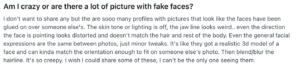
Conversely, critical user reviews target the high cost of premium tiers and the presence of abandoned accounts in the search stacks. Because the platform allows accounts to remain in the database indefinitely unless a user deletes them manually, people often spend time sending intros to profiles that were abandoned months ago. Active daters express frustration that the free tier has become heavily restricted compared to earlier versions of the site. 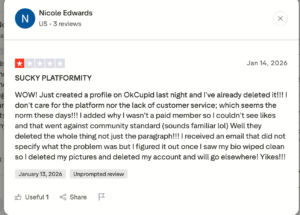
Managing Security: Is OkCupid Legit?
Because OkCupid profiles contain detailed information about your personal viewpoints and lifestyle habits, protecting your data requires active setting management.
The Face Check System
To fight the rise of AI-generated profiles, deepfakes, and automated spam bots, Match Group rolled out a mandatory video verification system. When you create an account or update your main profile picture, the app locks the interface and prompts you to complete a liveness scan.
The system asks you to record a short video selfie through your smartphone’s front camera. The algorithm scans the clip to ensure you are a real person and analyzes your facial geometry to create a temporary mathematical template, comparing it against your primary profile photo. Once approved, your account receives a blue checkmark badge. If a local dater does not have the blue badge on their card, treat the profile with caution.
Avoiding the Early Pivot
Romance scams often rely on a strategy known as the early pivot. If a potential match sends you a few polite introductory lines and then immediately insists on moving the chat off OkCupid to an external messaging app like WhatsApp or Telegram, you should hesitate to share your contact details.
Scammers push for an early pivot because they want to leave OkCupid before the platform’s automated text moderation filters flag their account for spam behavior. Once they move you to an unmonitored external chat app, they will typically start asking for financial help or pitch fake investments. Always keep your conversations inside the official app for at least a week before sharing your phone number.
How to Delete Your OkCupid Account Permanently
Removing the application icon from your smartphone screen will not close your account. Your personal data will remain visible in the directory, and your automated billing cycles will continue to run. You must complete the official account closure sequence to wipe your data and stop future charges.
1.Cancel your mobile store subscription. If you purchased your premium plan through Apple Pay or Google Play, open your smartphone's native subscription dashboard independently. Locate OkCupid in your active list, click 'Cancel Subscription,' and confirm that the auto-renew status is turned off.
2.Navigate to your account settings. Log into your profile using a web browser or open your mobile application dashboard. Click on your profile icon in the menu bar and select the 'Settings' gear icon.
3.Initialize the account closure link. Scroll to the bottom of the account settings menu, locate the text link that reads 'Go to Account Management,' and click on the 'Delete Account' prompt.
4.Confirm permanent server removal. Select your reason for leaving from the dropdown menu and input your current login password to verify your identity. Click the final 'Delete' button to instruct the servers to permanently erase your uploaded photos, question logs, and chat histories from the live database.
Final Verdict: Is OkCupid Good in 2026?
OkCupid remains an exceptionally effective tool for intentional daters who prioritize shared values, lifestyle alignment, and deep communication over quick, photo-based matches. The mandatory verification loops and the depth of the personality questionnaire make it one of the most comprehensive matching systems on the market.
As long as you stay mindful of the automatic renewal billing rules, filter for verified user badges, and spend the time to answer at least fifty compatibility prompts, the platform provides a highly reliable, data-driven environment for finding a committed, long-term partner.
Dating scams and stolen photos remain a common concern on unvetted websites. Before sharing personal details or moving a conversation to private messengers, learn how to date genuine European women without running into fake accounts by using services with strict identity checks.

Michaela Smith serves as the esteemed relationship expert at SafeDateOnline, bringing a wealth of knowledge and insight to the platform. With a background in psychology and counseling, Michaela offers invaluable advice and support to individuals seeking guidance in their romantic endeavors. Her expertise in understanding human behavior and interpersonal dynamics enables her to provide tailored recommendations and strategies for building healthy and fulfilling relationships. Michaela’s dedication to helping others navigate the complexities of dating and relationships makes her an invaluable asset to the SafeDateOnline community. Through her contributions, she empowers users to cultivate meaningful connections and navigate the challenges of modern romance with confidence and resilience.